Bees Seamless Patterns Digital Collection
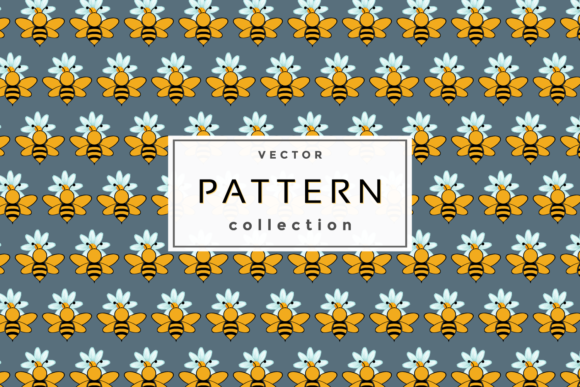
A set of seamless patterns built around bees, honeycombs, and nature-inspired motifs might sound like a niche design tool at first. But once you look closer, the versatility becomes clear. This digital product includes four file formats: an editable .eps and .Ai file for vector work, a .png with a transparent background, and a .jpg with a white background. The patterns are ready to use right after download, no extra setup required. Whether you are creating fabric rolls, wrapping paper, social media graphics, or classroom handouts, having a cohesive set of bee-themed repeats can save hours of manual work.
Because the patterns are seamless, they tile infinitely without visible breaks. That makes them suitable for both physical printing and digital layouts. The editable vector files also let you adjust colors, scale, or individual elements if your project calls for a custom touch. For many users, the real value lies in having a single download that covers multiple use cases without needing to buy separate assets for print, web, and merchandise.
What makes these patterns useful across different skill levels
A beginner might feel unsure about opening an .eps or .Ai file for the first time. If that sounds like you, know that most modern design software including Adobe Illustrator, Affinity Designer, and even free tools like Inkscape can handle these formats. The .png with a transparent background is especially forgiving: you can drag it into Canva, PowerPoint, or any basic image editor and layer it over photos, text, or colored backgrounds without messy white boxes. The .jpg version works well for quick previews or projects where a white backdrop fits your layout.
For experienced designers, the editable vectors are where the real flexibility lives. You can recolor the honeycomb cells, rotate the bee motifs, or scale the pattern density to match a specific print size. Because the files are grouped and layered, making those changes takes minutes rather than hours of rebuilding from scratch. If you produce fabric patterns, stationery collections, or digital assets for clients, having editable source files means you can adapt the same design for multiple products without buying a new set each time.
Hobbyists and DIY creators often care most about ease of use and instant results. The transparent .png lets you print iron-on transfers for tote bags, create custom phone wallpapers, or design party invitations with zero software learning curve. You just open the file, resize it, and place it where you want. The seamless nature also means you can cover large surfaces like scrapbook pages or wrapping paper without worrying about alignment.
Why different audiences value different aspects of the same product
Entrepreneurs and small business owners tend to evaluate digital assets based on commercial value and time saved. If you run a print-on-demand shop selling tote bags, mugs, or fabric by the yard, a single seamless pattern can become the basis for an entire product line. The editable vector files allow you to tweak the design for each product type, while the .png and .jpg versions work straight out of the box for mockups. Being able to download one bundle and immediately generate product images, print samples, and social media posts reduces the gap between idea and sale.
Educators and classroom creators often prioritize clarity and practicality. Bee-themed patterns fit perfectly into lessons about pollination, ecosystems, or agriculture. A teacher might use the patterns as borders for worksheets, backgrounds for slides, or visual aids during nature studies. The transparent .png is particularly handy here because it can be placed over text without distracting from the lesson content. Since the patterns are seamless, they also work well for decorating bulletin boards or creating reusable classroom labels.
Marketers and bloggers might look at the same files from a branding perspective. If your content focuses on sustainability, gardening, or natural living, a subtle bee pattern can reinforce your visual identity across website headers, social media templates, and email newsletters. The vector formats ensure crisp rendering at any screen size, while the .jpg version serves as a quick drop-in for blog post feature images. Having multiple formats also means you can maintain consistency whether you are designing in Canva, Adobe Suite, or a platform like Figma.
Practical examples for different types of users
Consider a freelancer who takes on branding projects for small organic farms. They can download these patterns, open the .Ai file, adjust the colors to match the farm's palette, and use the design for seed packets, booth banners, and social media assets. The client gets a cohesive look without the freelancer spending extra hours drawing bees from scratch. The same freelancer might also use the .png version for quick client mockups, then switch to the vector file once the design direction is approved.
A parent planning a first birthday party with a busy bee theme could use the .png with transparent background to create custom cupcake toppers, thank you tags, and a banner. No design experience needed—just drag, resize, and print on sticker paper or cardstock. The seamless nature means you can cover a full sheet of paper without gaps, which makes wrapping favor boxes or decorating a photo backdrop much simpler.
A publisher creating an educational children’s book about bees might integrate the patterns into chapter headings, activity pages, or the book cover. The editable vector files allow the designer to modify colors to fit the book’s palette and scale elements without losing quality. Because the patterns are seamless, they can fill full-page backgrounds without visible repetition artifacts, which keeps the layout looking professional.
Matching the product to your specific needs
Before making a purchase decision, it helps to ask yourself what you will actually do with the files. If your main goal is speed and you only need one format, the .png with transparent background offers the widest compatibility across apps and devices. If you plan to alter colors, remove elements, or combine patterns with other graphics, the .eps and .Ai files give you the most control. If you are printing on white paper or fabric and want to see exactly how the design looks without a transparent background, the .jpg version is your quickest preview.
Beginners should not feel intimidated by the vector formats. Many free online tutorials cover the basics of opening and editing .eps and .Ai files. Even if you never touch the vectors, the .png alone can cover a large range of projects from digital planners to printed labels. The key is to start with the format that matches your current comfort level and explore the others as you grow.
Professionals and creators with tight deadlines will appreciate having all four formats included. You can hand off the .png to a colleague who uses different software, keep the editable .Ai file for your own revisions, and export the .jpg for client approvals without any extra conversion steps. This flexibility reduces friction in collaborative workflows and keeps projects moving forward.
Long-term usefulness beyond one project
A well-designed seamless pattern bundle can become a resource you return to multiple times. The bee theme works across seasons, holidays, and campaigns, and the vector files let you refresh the look by changing colors or swapping elements. If you build a brand around nature, handmade goods, or children’s content, these patterns might appear in your work for years. The fact that the download includes both print-ready and web-ready formats also means you can reuse the same design for products, marketing, and packaging without recreating the asset.
For consumers and hobbyists who enjoy crafting, having the source files means you are never locked into one use case. You might start by printing a pattern on fabric for a quilt, then later use the same file to create a digital wallpaper for your tablet. The .eps and .Ai files also allow you to extract individual elements, like a single bee or a honeycomb cell, and use them as standalone graphics in other projects. That kind of flexibility adds value beyond the initial purchase.
Evaluating quality and reliability
When assessing a digital product like this one, consider how the patterns behave at different scales. A seamless design that looks good on screen might show awkward repetition when printed on a large banner or fabric panel. Vector files generally avoid this problem because they are resolution-independent, but the underlying motif layout still matters. Look for patterns where the repeat feels organic rather than mechanical, and check that the elements are distributed evenly enough to avoid obvious clumps or empty spots.
The inclusion of both .png (transparent background) and .jpg (white background) also tells you something about the product’s intended flexibility. The .png works well for layering over dark or colored surfaces, while the .jpg gives you a ready-to-use version for light backgrounds. Having both saves you from having to remove backgrounds yourself, which can be a tedious step especially for beginners or those working in non-vector software.
Final thoughts on choosing the right pattern bundle
Bees seamless patterns appeal to a wide range of users not because they are trendy, but because they solve a real practical need: a ready-to-use, adaptable design asset that works across print, digital, and merchandise applications. Whether you are a beginner looking for a quick solution for a party or classroom, a professional needing editable source files for client work, or an entrepreneur aiming to launch a product line, the combination of formats in this download gives you room to work the way you prefer. Start with the format that matches your current software and skill level, then explore the vector files as your confidence grows. The real value is having a single purchase that adapts to your project rather than forcing your project to adapt to the file.