Vintage Retro Patterns Digital Paper PNG for Modern Creative Workflows
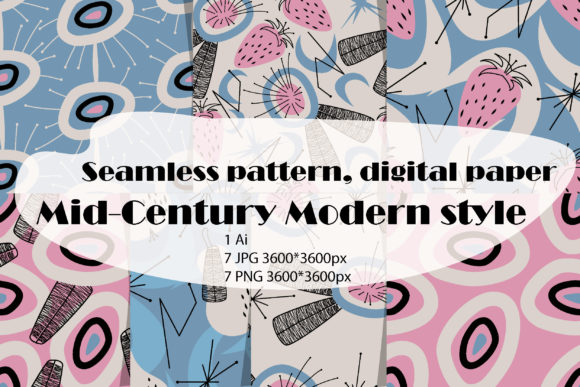
Design assets that balance nostalgia with utility are rare. Most pattern collections lean either heavily ornamental or purely minimalist, leaving a gap for those who need something both distinctive and adaptable. Vintage retro patterns digital paper PNG fills that gap with a deliberate mid-century modern aesthetic — abstract shapes, stripes, flowers, and fruits rendered in a style that feels curated rather than kitschy. This particular collection offers two size variants (large and slightly smaller) with seven elements each, packaged as PNG files with transparent backgrounds, JPG files, and an editable AI vector file at 3600 x 3600 pixels and 300 ppi. The color model is RGB, which means it is ready for screen-based projects straight out of the archive.
Understanding exactly what this resource contains and how it fits into actual production workflows makes the difference between downloading a file and putting it to effective use. Below, I walk through the practical considerations, integration points, and long-term value of this kind of asset package.
What the Package Actually Contains and Why the Format Matters
The compressed ZIP archive holds three distinct file types across two size groups. For each of the seven design motifs, you get a PNG with a transparent background, a high-quality JPG, and a single AI vector file that contains all elements. The resolution is consistent at 3600 x 3600 pixels at 300 ppi, which gives you enough detail for large-format printing or high-resolution digital displays. The RGB color model is standard for anything that will live on a screen, but it also converts cleanly to CMYK for print when you manage the profile at the output stage.
Having both PNG and JPG versions in the same download saves time during project setup. The PNG files are your go-to for layering, compositing, and any workflow where you need transparency. The JPG files are useful for quick previews, mood boards, or situations where file size matters more than editability. The AI vector file is the most flexible of the three. Because vector art is resolution-independent, you can scale each pattern up or down, recolor individual elements, and modify shapes without losing quality. If you work in Adobe Illustrator, this file becomes the foundation for creating custom variations that stay consistent with the original style.
Where Vintage Retro Patterns Fit in a Real Project Workflow
Design assets are most useful when they enter the workflow at the right moment. Vintage retro patterns digital paper PNG works well at multiple stages of a project, but the way you use it changes depending on whether you are in the planning, execution, or refinement phase.
During the planning phase, these patterns serve as reference material. If you are developing a brand identity, packaging line, or social media series with a mid-century modern vibe, scrolling through the seven designs gives you a concrete sense of color palettes, shape language, and compositional density. You can place the JPGs into a mood board or slide deck to communicate the visual direction to clients or collaborators before committing to a final design direction.
In the execution phase, the PNG files with transparent backgrounds become direct design elements. Drop them into a layout in Photoshop, Canva, Affinity Designer, or any layer-based tool. Because the backgrounds are transparent, they sit on top of solid colors, photographs, or other textures without manual masking. This is where the two size options become practical. The larger patterns cover a full page or screen area with one placement. The slightly smaller patterns work better for repeated tiling, accent areas, or when you want the pattern to appear more contained within a composition.
During the refinement and production phase, the AI vector file becomes your safety net. Need to change the dominant color from mustard yellow to olive green because the client shifted direction? Open the vector file, adjust the swatches, and export new PNGs and JPGs that match the updated palette. Need to combine elements from two different patterns into a single seamless design? The vector format makes that kind of customization straightforward. This ability to iterate without starting from scratch is what turns a static asset pack into a reusable resource that stays relevant across multiple projects.
Practical Implementation Tips for Different Use Cases
How you integrate these patterns depends heavily on your output medium and the tools you already use. Below are concrete approaches for common scenarios.
Digital Product Design and Social Media
For anyone creating digital products — planners, journals, printable wall art, or social media templates — the PNG files are the most efficient entry point. Load them directly into your design software and use them as background layers. Because the resolution is 3600 pixels square, they cover standard social media dimensions (1080 x 1080 px) with room to spare. For Instagram posts or Pinterest pins, you can place the pattern on a layer, reduce opacity to 30–50 percent, and overlay text or illustrations. The transparent background means you can also use the patterns as borders, frames, or accent shapes by placing them over colored or gradient backgrounds.
For digital planners or printable organizers, the smaller pattern size works well for section headers, tabs, or weekly spread backgrounds. The larger size can serve as a full-page decorative sheet or a cover page. If you sell digital products on platforms like Etsy or Gumroad, packaging these patterns as part of a larger bundle adds perceived value without requiring extra design work from you.
Print-on-Demand and Physical Products
Print-on-demand workflows require assets that are both high-resolution and color-consistent. At 300 ppi, these patterns meet the standard for most print providers. Upload the JPG or PNG directly to your chosen platform for products like notebooks, phone cases, tote bags, or fabric prints. Before uploading, check whether the platform expects RGB or CMYK. Print-on-demand services typically accept RGB and convert internally, but for best results, convert the vector file to CMYK yourself and make manual adjustments to ensure the vintage tones — muted greens, warm oranges, faded pinks — reproduce faithfully on fabric or paper.
If you are designing a repeating pattern for a product like wrapping paper or fabric, the AI vector file is your best option. Open the file, select the motif, and use Illustrator's pattern tile tool to create a seamless repeat. Because the original motifs are already built as vector art, you maintain full control over spacing, scale, and rotation. This process is much faster than photographing or scanning physical retro patterns and trying to stitch them together digitally.
Branding and Identity Work
Small business owners and brand designers can use these patterns as secondary brand elements. A pattern that appears on business cards, website headers, or packaging adds texture and personality without requiring a full custom illustration pipeline. Use the PNG on your website as a hero section background or a divider between content blocks. For print materials like letterhead or brochures, place the pattern as a watermark or accent strip. The mid-century modern style works particularly well for brands in the home decor, stationery, boutique food, or lifestyle categories where a nostalgic but clean visual language reinforces the brand story.
When using patterns in branding, consistency matters. Stick to one or two motifs across the whole touchpoint system rather than rotating through all seven randomly. This creates visual recognition. The vector file makes it easy to extract a single motif and adapt it for different sizes and placements while keeping the geometry identical.
Organizing the Archive for Long-Term Use
A ZIP archive with fourteen files and an AI document can feel cluttered if not organized before you start working. A few minutes of setup now saves time on every future project. Here is a practical approach.
Unzip the archive into a dedicated folder named something like "Vintage Retro Patterns - Mid-Century Modern." Inside that folder, create subfolders: "PNG_Large," "PNG_Small," "JPG_Large," "JPG_Small," and "Vector." Drop the files into the corresponding folders. Rename each file with a consistent convention that includes the motif name and the size — for example, "retro-floral-large.png" or "abstract-stripe-small.jpg." If the original filenames are generic, this renaming step pays off quickly when you search for a specific pattern later.
If you use a digital asset management system like Adobe Bridge, Eagle, or even a cloud storage platform with search, tag the files with keywords like "vintage," "retro," "mid-century," "pattern," and "seamless." This makes retrieval faster when you are building a new project and need a specific style. For users who work across multiple devices, keeping the master archive in a synced folder (Dropbox, Google Drive, iCloud) ensures the vector file is always accessible when you need to make edits.
Quality Control and Pre-Flight Checks
Before you integrate any pattern into a final deliverable, run a quick quality control check. Open the PNG file at 100 percent zoom and inspect the edges for any stray pixels or artifacts from the transparent background. At 3600 pixels, the files should be clean, but monitor settings can sometimes hide subtle issues. For the JPG files, check that the compression did not introduce banding in the gradient areas or soft transitions. The vintage aesthetic uses flat colors and clean shapes, so banding is less likely, but it is worth confirming.
For print projects, do a test print on your home printer or upload a sample to your print provider before committing to a large run. Colors that look vibrant on a backlit monitor can appear dull or shifted on paper. If the print looks too saturated or too muted, go back to the AI vector file, adjust the color values, and re-export. Because the vector file preserves every element as separate objects, you can selectively adjust individual fruits, flowers, or stripes without affecting the rest of the design.
Long-Term Value and Reusability
What makes a digital asset pack worth the investment is not the number of files but how many times you can repurpose it across different contexts. Vintage retro patterns digital paper PNG offers reusability on multiple levels. The seven motifs give you enough variety to create distinct looks for different projects without exhausting the set. The two sizes let you use the same motif in both dominant and supporting roles. The vector file gives you the ability to evolve the designs as your needs change — recoloring, rescaling, recombining, or extracting individual elements for use in other compositions.
If you run a creative business, this kind of pack also serves as a style anchor. When you take on a new client who wants a mid-century modern look, you can start with these patterns as a foundation instead of building everything from scratch. That translates directly to faster turnaround times and more consistent output. For educators and content creators, the patterns add visual interest to worksheets, presentations, or video thumbnails with minimal effort.
The digital-only delivery model is worth noting. Because the files are for download only, there is no physical inventory to manage and no risk of damaged goods. You gain immediate access to the entire archive as soon as the transaction completes, which fits perfectly into tight production schedules. Keep the original ZIP archive stored in a secure location, and you have a reliable resource that does not degrade or go out of stock.
Final Observations on Integration
Assets like vintage retro patterns digital paper PNG work best when you treat them as a starting point rather than a finished product. The transparent PNGs save you from masking work. The JPGs give you quick previews. The AI vector file gives you creative control. Combining all three in one package means you do not have to switch between multiple sources or waste time reformatting files. Whether you are designing a brand identity, producing digital products, or creating content for social media, these patterns fit into your existing toolkit with minimal friction.
The mid-century modern aesthetic is not just a trend — it has enduring appeal because it balances ornament and simplicity. Abstract shapes paired with recognizable flowers and fruits create patterns that feel familiar without being predictable. For anyone who needs to add a layer of visual texture to their work without overcomplicating the design process, this collection provides a reliable, editable, and versatile foundation.