Cute Easter Patterns Design: A Practical Guide to Choosing and Using Them for Print Projects
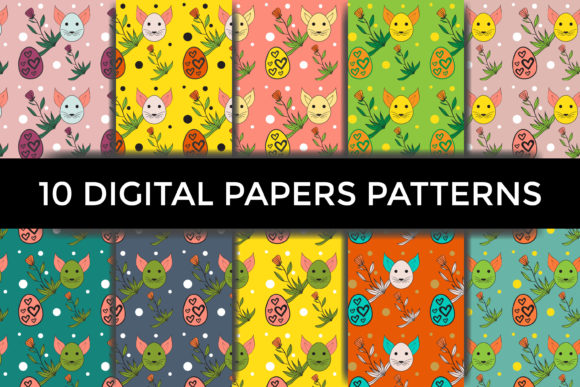
Whether you are a small business owner preparing seasonal packaging, a blogger creating festive graphics, or a hobbyist assembling a scrapbook, decorative patterns can make or break your project. Cute Easter patterns design with decorated eggs and other spring elements offer a cheerful, versatile foundation for print items like gift wrap, tags, party banners, and craft backgrounds. But not all pattern sets are created equal, and even a high-quality collection can fall short if used incorrectly. This guide walks you through common pitfalls and shows you how to get the most from a professional set—like one that includes 10 seamless patterns in both JPG and vector AI formats at 300 DPI—so your finished work looks polished and prints cleanly.
Understanding the nuances of file formats, resolution, color modes, and pattern repeats helps you avoid wasted time, materials, and money. Let's look at the decisions that matter most.
1. Overlooking File Formats and Their Best Uses
One of the most frequent mistakes is treating all digital pattern files as interchangeable. A set may come with JPG versions ready for quick use and AI CC vector files for advanced editing. The JPG files in this particular collection are sized at 18.28 × 18.28 inches on a colorful background, which is ideal for covering large surfaces like wrapping paper or tablecloths. But if you need to scale the pattern down for a small sticker or up for a poster without losing sharpness, the vector format becomes essential.
Why this is a problem: Using a raster JPG when scaling dramatically changes the output can result in pixelation or blur. Conversely, opening a vector file without the proper software might lead to frustration or flattened layers that are no longer editable.
Better approach: Match the format to your workflow. For quick layouts or projects that stay at the given size, the JPG works fine. For resizing, recoloring, or rearranging elements, rely on the vector AI files. If you don't own Adobe Illustrator, check that your design software supports AI CC or can import the file as a scalable object (some apps convert it to a bitmap, which defeats the purpose).
2. Ignoring Resolution and DPI for Print Projects
Digital screens and print have very different resolution requirements. The set here boasts 300 DPI in its raster formats, which is the industry standard for high-quality print. Yet many creators mistakenly use web-resolution images (72 DPI) for printed items, expecting crisp results. Even a pretty design will look soft or jagged if the resolution is too low.
The consequence: A scrapbook page or packaging sample that appears stunning on screen can disappoint when printed, making your work look amateurish. Clients or customers may perceive the product as low quality.
How to avoid this: Always verify the DPI of downloaded files before committing to print. If you are using the included JPGs, they are already print-ready at 300 DPI. When repurposing these patterns for other projects, maintain that resolution. In design software, set your document to 300 DPI from the start, then place the pattern. Avoid upsampling lower-resolution images to 300 DPI—it doesn't add real detail, only larger pixels.
3. Neglecting Color Mode: CMYK vs. RGB
Another subtle but significant oversight involves color space. Digital designs typically reside in RGB, while commercial printing uses CMYK. This particular set is described with a colorful background, which should ideally be provided in CMYK if intended for print. However, many downloadable pattern collections default to RGB unless the seller specifically converts them.
What can go wrong: Printing an RGB file can produce unexpected color shifts—bright neon pinks may turn muddy, and soft pastel yellows can appear dull. Even a cute Easter palette of pastels and egg-themed hues can lose its charm.
Actionable advice: Before purchasing or using the patterns, confirm whether the files are in CMYK or RGB. If they are RGB, convert them to CMYK in your design software (most programs allow this) and do a soft proof to see how colors will shift. For the vector AI files, you can easily change the color mode and adjust specific hues. For the JPGs, conversion is possible but less flexible—test a small print first.
4. Misunderstanding Seamless Repeats and Tile Size
The phrase “seamless pattern” means the design repeats perfectly without visible edges when tiled. That sounds straightforward, but many people assume any pretty pattern will tile flawlessly. With a professional set like this one, the repeat is built in. Yet common mistakes include not knowing the tile size or trying to tile the pattern in software incorrectly.
Example of a mistake: You download one of the JPG patterns, which is 18.28 inches square. You then create a 12×12 inch scrapbook page and place the pattern as a single image, stretching it to fill the page. The result: the design is scaled up, the eggs and elements become larger, and the edges don't align because the tile was not designed for that size.
Better approach: Use the pattern as a repeating background rather than a single image. In most design applications, you can define a pattern swatch using the tile file. Keep the original tile size (18.28 inches) and let the software repeat it. If you need a smaller repeat, do it within the vector file where you can resize the tile while preserving the seamless quality. Always test the repeat on a small canvas before producing final prints.
5. Overlooking Scalability in Vector vs. Raster
One of the greatest advantages of having both raster and vector versions is flexibility. Yet many users stick with the JPG because they find vectors intimidating or lack the proper software. This limits what you can achieve. Similarly, some designers open a vector file and immediately rasterize it without reason, losing the benefit of scalability.
The missed opportunity: With the AI CC vector file, you can change the color of individual eggs, adjust the spacing, add your own text overlays, or combine elements from different patterns. This is especially useful for entrepreneurs creating unique packaging or branding that needs a custom look. Raster-only users cannot do this without heavy manual editing.
How to overcome this: Invest a little time learning basic vector editing—even free tools like Inkscape can import AI files (with some limitations). If you use Adobe Illustrator, the pattern files become fully editable objects. Keep a copy of both formats; use the vector for customization and the raster for quick placements that don't require changes.
6. Failing to Check Licensing and Usage Rights
When buying digital pattern sets, especially for commercial purposes (selling products, marketing materials), misinterpretation of the license can cause legal headaches. The set from JOYNA is likely intended for both personal and commercial use, but not all sellers grant the same rights. Some forbid using the patterns in resold digital downloads; others require credit.
What happens: A small business owner prints the pattern on packaging and sells the product, only to find later that the license restricts commercial use to a limited number of copies or requires an extended license.
Practical check: Read the product description or included license document before downloading. If terms are unclear, contact the seller. For this set, the description notes it’s perfect for scrapbooking, packaging, or backgrounds—strong hint that commercial use is allowed, but confirm. If you plan to use the patterns for print-on-demand items (e.g., mugs, t-shirts), ensure the license covers that. Keeping a copy of the license with your project files is a good habit.
7. Forgetting to Test on Real Materials
Even after you've selected the right format, resolution, and color mode, a final mistake is trusting the on-screen preview blindly. Different printers, papers, and substrates affect how the pattern appears. A pastel egg design that looks charming on a glossy brochure might appear washed out on uncoated craft paper.
Why it matters: You might produce hundreds of printed pieces only to realize the background color clashes with your brand or the details of the decorated eggs get lost in the texture of the paper.
Corrective step: Print a small sample on the exact material you plan to use. Check for color accuracy, pattern scale, and overall aesthetics. Adjust contrast or saturation if needed. For vectors, you can tweak the design. For JPGs, you might need to apply a slight overlay or change the background color. This small step saves time and waste.
What to Check Before You Buy or Use a Cute Easter Patterns Set
Based on these common pitfalls, here’s a quick checklist for anyone evaluating a pattern collection like this one:
- File formats – Does it include both raster and vector? For print, JPG at 300 DPI is good; AI CC gives editing power.
- Print dimensions – Are the tiles large enough for your project? 18.28 inches is generous for most craft backgrounds.
- Color mode – Are files in CMYK? If not, can you convert them yourself?
- Seamless quality – Are repeats tested? Does the set explicitly say “seamless”?
- Resolution – Confirm 300 DPI for all raster files.
- License – Understand what you can do with the patterns, especially for commercial products.
- Compatibility – Can your software open AI CC files? If not, are alternative formats available (EPS, PNG)?
Taking a few moments to verify these points upfront prevents disappointment and ensures your Easter projects come together smoothly.
Patterns with decorated eggs and seasonal motifs bring joy and professionalism to any print item. By avoiding the mistakes outlined here—choosing the wrong format, ignoring resolution, neglecting color modes, misunderstanding seamless repeats, and skipping tests—you position yourself to create beautiful, reliable results. Whether you are designing party supplies, gift packaging, or digital backgrounds, a thoughtful approach to selecting and applying cute Easter patterns design elevates your work and saves effort in the long run. Thank you for visiting JOYNA’s store; the patterns are ready to help you craft something memorable.