Digital Paper Patterns - Quatrefoil: Practical Applications for Design and Production Workflows
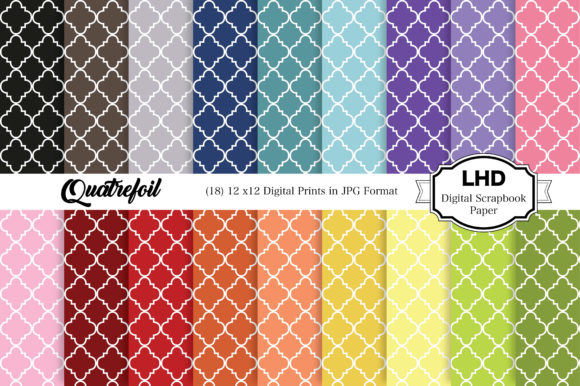
Digital paper patterns serve as foundational assets across a broad range of creative and professional projects. Among the many pattern styles available, the quatrefoil stands out for its symmetry, historical resonance, and visual versatility. The Digital Paper Patterns - Quatrefoil collection offers 18 high-resolution JPG files, each measuring 12 x 12 inches at 300 dpi, providing a rainbow of quatrefoil designs that can be deployed in print, on screen, and across physical products. Understanding how to integrate these files into your existing workflow—whether you are designing invites, crafting stationery, building website assets, or producing decor—determines how much value you extract from the set.
What the Quatrefoil Digital Paper Set Contains and Why It Matters
The collection delivers 18 distinct quatrefoil patterns in a range of colors. Each file is rendered at 3600 x 3600 pixels, which translates to a 12 x 12 inch sheet at 300 dpi. This specification matters because it gives you flexibility: you can print at full size for scrapbooking or card making, or scale down for hang tags and smaller projects without losing clarity. The JPG format ensures broad compatibility across design software, operating systems, and printing services, so you are not locked into a proprietary tool or platform.
The quatrefoil motif itself—a four-lobed shape often associated with medieval architecture, heraldry, and decorative arts—offers a balanced, repeating pattern that works well in both foreground and background roles. When you have 18 color variations in a single download, you reduce the time spent sourcing complementary patterns from multiple vendors. This centralization supports consistency across projects and simplifies asset management.
Preparing Your Digital Assets for Smooth Integration
Before you begin any project, preparation of your pattern files determines how efficiently you can move from concept to finished piece. The instant download format eliminates shipping delays and physical storage concerns, but you still need to organize the files in a way that aligns with how you work.
File Management and Naming Conventions
The 18 JPG files arrive with clear identities, but you may want to rename them according to your own taxonomy. For example, you could group them by color family, by intended use, or by project name. If you manage multiple digital paper collections, a consistent naming convention helps you locate the exact quatrefoil pattern you need without opening dozens of previews. Storing the files in a dedicated folder within your design assets library, with subfolders for patterns, textures, and backgrounds, keeps your workflow organized over the long term.
Resolution and Color Profile Checks
Because the files are supplied at 300 dpi in JPG format, they are print-ready for most home and commercial printers. However, you should verify that your software interprets the color profile correctly. If you work in CMYK for print projects, you may need to convert the RGB JPG files to your preferred color space. This step is especially important for wrapping paper, birthday cards, and wedding stationery where color fidelity matters. A quick test print on your own equipment before committing to a full run can save time and materials.
Integrating Quatrefoil Digital Papers into Print-Based Projects
The 12 x 12 inch sheet size aligns perfectly with standard scrapbooking and card making dimensions. But the utility extends beyond those obvious applications when you think about how patterns interact with other design elements.
Invitations and Stationery
For invites and stationery, the quatrefoil pattern can serve as a full background, a border, or a die-cut overlay. If you are producing layered invitations, you might use a muted quatrefoil pattern as the base layer and add a solid card stock layer on top. The 300 dpi resolution ensures that even when you print at 50% scale for a smaller card, the pattern remains crisp. You can also rotate or mirror the pattern to create unique layouts without needing additional assets.
Wrapping Paper and Hang Tags
When producing wrapping paper, the 12 x 12 inch tile size becomes a repeating unit. You can print multiple sheets and tile them physically, or use software to create a larger seamless repeating pattern. For hang tags, you can place the pattern on one side and your logo or messaging on the other. The rainbow color options give you flexibility: use warm tones for holiday gifts, cool tones for baby showers, or neutral shades for corporate branding.
Card Making and Decorations
In card making, you often need patterns that do not overpower the focal image. The quatrefoil design, with its rhythmic repetition, provides a structured backdrop that complements typography and illustrations. For party decorations like bunting, cupcake toppers, or table runners, printing the pattern on card stock adds a cohesive visual theme. Because you have 18 variations, you can assign specific colors to different elements of a single event.
Digital Applications: Website, Blog, and Social Media Assets
Digital projects require careful consideration of file size, resolution, and repeatability. The 3600 x 3600 pixel dimensions give you ample resolution for full-screen backgrounds on websites and blogs, but you may need to compress the JPG for faster loading times.
Website and Blog Wallpaper
For website backgrounds, you can use the quatrefoil pattern as a subtle texture behind content blocks, or as a hero section backdrop. The repeating nature of the pattern works well for full-width designs because it tiles seamlessly. To maintain performance, resize the original file to match your site's maximum container width and optimize the JPG compression level. If your site uses a responsive grid, you can serve different scaled versions of the same pattern based on viewport size.
Social Media Graphics and Digital Stationery
Digital stationery, such as email headers, social media templates, or Zoom backgrounds, benefits from patterns that read clearly on screens. The quatrefoil's moderate level of detail holds up well at typical screen resolutions. You can overlay semi-transparent text or graphics on top of the pattern, adjusting opacity to ensure readability. For recurring social media posts, using a consistent quatrefoil pattern in your brand colors reinforces visual identity without requiring custom illustration for every post.
Efficiency Gains in Batch Production and Recurring Projects
One of the strongest arguments for using a curated digital paper set like this one is the reduction in repetitive design work. If you produce birthday cards, invites, or promotional materials on a regular basis, the quatrefoil patterns can be reused across multiple projects with different color assignments.
Templates and Master Files
Build master template files in your design software that reference the quatrefoil patterns as external assets. When you need to create a new card or poster, simply swap the pattern file while keeping your typography, layout, and branding elements in place. This approach cuts down the time spent on each iteration and ensures that your design language remains consistent. The 18-color palette gives you enough variety to differentiate seasonal offers, product lines, or client deliverables without starting from scratch.
Quality Control Across Print Runs
When you rely on a single source for your patterns, you reduce the risk of color inconsistency that can occur when mixing files from different vendors. Before printing a large batch, print a single proof sheet with all 18 patterns at small scale. This lets you verify how each color looks on your chosen paper stock and adjust your design accordingly. For projects that require exact color matching, you can use the JPGs as reference guides for communicating with your print service provider.
Long-Term Asset Management and Archival Considerations
Digital files have the advantage of not degrading over time, but they still require thoughtful storage and backup practices. The 18 JPG files, while individually manageable, become part of a larger library as you acquire more pattern sets.
Backup and Version Control
Store the original downloaded files in a primary archive folder and create working copies for each project. This prevents accidental overwrites and allows you to revert to the unmodified pattern if needed. Cloud storage with sync capabilities gives you access to the patterns across multiple devices, which is useful if you work on different computers or collaborate with others. Tagging the files with keywords like "quatrefoil," "rainbow," and "12x12" makes them searchable even if your folder structure changes.
Cross-Platform Compatibility
The JPG format is universally supported, but you should test the files in each application you use. Some software may apply automatic sharpening or color adjustments that alter the pattern's appearance. By establishing a standard import workflow—opening the file, checking dimensions, confirming resolution, and verifying color—you can catch discrepancies early. Over time, this routine becomes automatic and reduces the friction of moving between tools.
Adapting the Patterns for Specialized Use Cases
Beyond the common applications, the quatrefoil digital paper set can support niche workflows that benefit from its specific geometry.
Educational Materials and Presentations
For educators and trainers, the quatrefoil pattern can serve as a neutral background for slides, handouts, or activity sheets. The repeating motif provides visual interest without distracting from content. You can assign different colors to different modules or topics, helping learners navigate materials intuitively.
Product Prototyping and Packaging Concepts
Entrepreneurs and small business owners who prototype packaging can print the quatrefoil patterns on adhesive paper or lightweight card stock to mock up boxes, bags, or labels. Seeing the pattern on a physical prototype reveals issues like alignment, seam matching, and visual weight that are harder to assess on screen. Having 18 color options allows you to test multiple branding directions in a single prototyping session.
Practical Workflow Example: Producing a Birthday Card Series
To illustrate how the Digital Paper Patterns - Quatrefoil set integrates into a real production process, consider a freelancer who needs to deliver 12 unique birthday cards for an online shop.
- Asset Preparation: Download and organize the 18 JPG files into a project folder. Rename them by color for quick reference.
- Template Creation: Build a 5 x 7 inch document in design software with guides for trim and bleed. Place one quatrefoil pattern as the background layer.
- Color Assignment: Select three to four patterns that suit the card's theme. For a children's birthday series, use bright rainbow variations. For an elegant adult series, use muted or jewel tones.
- Design Variation: For each card, adjust the pattern opacity, add a solid color overlay, or rotate the pattern. Change the typography and embellishments while keeping the same base template.
- Proofing: Export low-resolution proofs for client review. Once approved, export the final JPGs at 300 dpi for printing.
- Production: Send the files to a print service or print in-house. Use the remaining patterns for matching tags and packaging.
This workflow reduces design time for each card because the pattern selection and placement are resolved early. The consistency across the series also strengthens the shop's visual identity.
Observations on Usability and Long-Term Value
The quatrefoil pattern is not a fleeting trend. Its presence in design history means it continues to feel relevant across various aesthetics, from traditional to modern. The 18-color range in this set gives you latitude to match seasonal palettes, brand guidelines, or personal preferences without buying multiple collections. Over time, you will find that certain patterns become go-to choices for specific project types, while others remain available for experimentation.
File format and resolution are the two technical factors that most directly affect usability. The JPG format trades some flexibility for broad compatibility, but for most print and digital applications, the quality loss is negligible at 300 dpi. If you need transparency or layered editing, you can use the JPG as a base and create masks or selections in your software. The 12 x 12 inch sheet size is a standard that aligns with common printer paper sizes and scrapbooking supplies, reducing waste and simplifying setup.
Integration into an existing workflow requires minimal friction: unzip the download, import into your software, and begin designing. The patterns do not demand specialized plugins, custom color profiles, or learning new tools. This low barrier to entry allows you to focus on the creative and logistical aspects of your project rather than on file management.
For professionals who produce content regularly, having a reliable set of digital papers reduces decision fatigue. Instead of searching for a pattern each time, you draw from a known collection. This efficiency compounds over months and years, making the initial download a strategic investment in your production capacity.
The quatrefoil digital paper set occupies a specific niche: it provides a classic pattern in a range of colors at a resolution and size that supports both print and digital use. Whether you are preparing a batch of invitations, refreshing your website background, or prototyping product packaging, the 18 files give you a solid starting point. By thinking of these patterns not as standalone images but as components within a larger workflow, you can extract maximum value from each file while maintaining consistency, efficiency, and quality across your projects.