Summer Patterns Digital Paper Adds Style to Everyday Projects
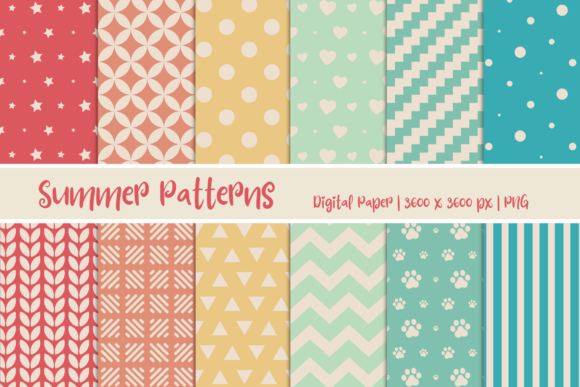
It starts with a simple need. You are creating something for the warmer months, and you want it to feel fresh, lively, and put together without spending hours designing from scratch. That is where a tool like Summer Patterns Digital Paper steps in. This set of twelve digital papers offers a direct path from idea to finished piece, whether you are working on an invitation, a web banner, a scrapbook page, or a social media post. The files are PNG format at 3600 x 3600 pixels, which means they hold up well across both digital and print uses. But the real value lies in how they fit into real workflows for different people.
Party Planning Becomes Less Stressful
Anyone who has organized a summer gathering knows that the details add up. The theme, the colors, the food, and then the paper goods. With a set of coordinated digital papers, you can create your own invitations, thank-you cards, place cards, and even banner decorations. Instead of hunting through store shelves for matching designs, you open the files, pick a pattern that fits your mood, and customize the text yourself. For a backyard barbecue, a pattern with subtle grill marks or citrus slices sets the tone. For a baby shower, softer floral or geometric patterns in pastel tones work well. The 3600 x 3600 pixel resolution gives you flexibility to print at various sizes without losing crispness, so a small tag or a large poster both look clean.
What to Consider for Printed Invitations
When using digital paper for print, check your printer's color profile and paper type. Glossy photo paper makes patterns pop, while matte cardstock gives a softer, more elegant finish. Test a small sample first because screen colors can shift slightly in print. The PNG format preserves transparency if you need to layer the pattern over other elements, but for most invitation layouts, you will place the pattern as a background and add text or images on top. One limitation is that the papers come as full sheets, so you may need to crop or resize them to fit specific card dimensions. This is straightforward in any basic image editor.
Web and Social Media Design Moves Faster
Digital designers often face tight deadlines. Having a library of ready-to-use backgrounds cuts down the time spent searching for textures or creating them from scratch. Summer Patterns Digital Paper works well as a backdrop for social media banners, blog headers, email newsletters, and product mockups. The high resolution ensures that even on large screens, the pattern stays sharp. For an Instagram post promoting a summer sale, you can place a bright pattern behind your product image and add a short headline. The contrast between the pattern and the text matters, so consider using a semi-transparent overlay or a solid text box if the pattern is busy.
Different Industries, Same Base Resource
- E-commerce sellers can use the papers as backgrounds for product photos. A handmade jewelry seller might photograph necklaces against a light floral pattern, while a candle maker could use a warm citrus or stripe design. The pattern adds context and seasonality without overpowering the product.
- Social media managers for cafes or restaurants can create consistent visual themes across posts. A pattern with watermelon slices or ice cream cones works for menu features, while a more neutral geometric pattern can frame customer photos or announcements.
- Freelance graphic designers can offer clients seasonal branding packages. The set gives them a starting point to build mood boards, draft proposals, or create sample social graphics quickly.
- Teachers and educators preparing summer camp materials or classroom decorations can print the papers for bulletin boards, name tags, or activity sheets. The patterns bring a cheerful look to otherwise plain materials.
Scrapbooking and Memory Keeping Get a Fresh Layer
Scrapbookers and memory keepers often look for papers that evoke a specific time or feeling. Summer is about lightness, warmth, and often a bit of nostalgia. The patterns in this set cover a range of styles from bold and bright to soft and subtle. When layering photos, journaling cards, and embellishments, the digital paper serves as the foundation. Because the files are 3600 x 3600 pixels, you can print them at 12 x 12 inches at 300 DPI, which is the standard scrapbook page size. This eliminates the need to piece together smaller prints. One practical tip is to save a few patterns in grayscale or desaturated versions. This gives you a neutral background that does not compete with colorful photos.
Consider Your Page Hierarchy
Patterns with high detail work best as accents rather than full-page backgrounds. You might use a busy pattern for a small mat behind a photo or as a strip along the bottom of the page. Simpler patterns with more negative space are better for full-page backgrounds where you plan to add multiple elements. The set includes both types, so you can mix them within the same layout. If you are working digitally, you can also adjust the opacity of the pattern layer to tone it down further.
Craft Projects and DIY Decor Become More Polished
Beyond traditional scrapbooking, these papers are useful for a range of craft projects. Gift wrap, gift tags, garlands, card inserts, paper lanterns, and even decoupage on small objects. The key advantage is that you print only what you need. If you are making a dozen gift tags for a bridal shower, you print one sheet of the pattern you like and cut it down. There is no waste from a whole pad of themed paper that you might never use again. The PNG format also allows you to import the pattern into cutting machine software like Cricut Design Space or Silhouette Studio. You can then print and cut precise shapes such as circles, hearts, or custom letters.
Color Consistency Across Projects
One limitation to note is that printed colors can vary between different printers and paper brands. If you are creating a set of matching items for an event, print all of them on the same printer and the same paper stock at the same time. This avoids slight shifts in hue or saturation. For digital projects, color consistency is less of an issue because screens are calibrated differently anyway. The patterns are designed with summer palettes that include warm oranges, cool blues, fresh greens, and soft neutrals. These combinations are versatile enough to pair with many solid colors you might already have in your supplies.
Business Branding Gets a Seasonal Refresh
Small business owners often update their visuals for different seasons to stay relevant and engaging. Using Summer Patterns Digital Paper, you can refresh your website background, your email template headers, your social media profile frames, and even your packaging inserts. The consistency across platforms builds recognition while the seasonal touch shows that the business is active and attentive. For a bakery, a pattern with lemon slices or berries in the background of a weekly newsletter immediately signals summer specials. For a yoga studio, a pattern with soft waves or leaf motifs aligns with a summer wellness theme.
What to Watch for in Digital Use
When using these papers as website backgrounds, be mindful of file size. The 3600 x 3600 pixel PNG files are large, which is excellent for print but can slow down web pages if used directly. Resize the image to the actual display dimensions before uploading. Convert to JPEG if you do not need transparency, as this reduces file size significantly. Also, ensure that text overlaid on the pattern has enough contrast. A white text box with a semi-transparent black overlay works well over busy patterns. A simple drop shadow on the text can also improve readability without changing the background.
Event Decor and Signage Made Simple
For anyone organizing a summer event such as a wedding, a graduation party, a corporate picnic, or a community fair, custom signage adds a professional touch. Welcome signs, table numbers, menu cards, directional arrows, and photo booth backdrops can all be created using the digital papers. The 3600 x 3600 pixel resolution allows you to print at sizes up to 12 x 12 inches at 300 DPI. For larger signage, you can tile the pattern across multiple sheets or resize it in your editing software, though resizing beyond native resolution may soften the detail. If you need a large backdrop, consider printing the pattern at a lower DPI for a mural effect or using an online printing service that handles large format prints.
Matching Different Elements Without Matching Everything
Having twelve different patterns means you can coordinate without being matchy. Use one pattern for the main signage, a complementary pattern for table numbers, and a third for menu cards. This creates visual interest while keeping a cohesive color story. The set likely includes variations like stripes, polka dots, florals, geometrics, and abstract textures. This range lets you assign different moods to different areas of the event. For example, a more formal pattern for the welcome area and a playful one for the dessert table.
Practical Considerations Before You Download
Before using any digital paper set, think about your primary output format. If you are mainly working digitally, the PNG format is ideal because it supports transparency and high resolution. If you plan to print at home, check that your printer handles 3600 pixel widths without issues. Most modern printers do, but older models may struggle with very large file sizes. You can always reduce the resolution in your editing software to match your printer's capabilities. Also, consider the commercial use terms. Many digital paper sets allow personal use only, while others include commercial licenses for selling finished products. Verify the license that comes with this set if you intend to sell items such as cards, invitations, or digital templates.
Storage and Organization Tips
These files are large, so organize them in a folder on your computer or cloud storage with clear naming conventions. You might rename the files based on the pattern type or color to make selection easier later. If you work across multiple devices, keep a synced folder so you always have access. Some users find it helpful to create a preview contact sheet with thumbnails of all twelve patterns. This saves time when you are quickly browsing for a specific look.
The real strength of a resource like Summer Patterns Digital Paper is how it reduces the gap between an idea and a finished project. Instead of learning complex design software or spending hours hunting for the right texture, you have a set of high-quality, ready-to-use backgrounds that fit a wide range of personal and professional needs. Whether you are a parent planning a birthday party, a designer building a client presentation, a teacher preparing classroom materials, or a small business owner refreshing your brand for the season, these papers offer a practical starting point. The limitations are manageable with a little foresight about printing or digital optimization. And the variety across twelve patterns means you are unlikely to run out of ways to apply them. Summer projects tend to be lighthearted and colorful, and having the right foundation makes the whole process more enjoyable. That is ultimately what this set delivers: a simple, effective way to bring warmth and personality to your work without unnecessary complexity.