Camping - Patterns: A Versatile Design Collection for Creative Projects
Pattern assets are often the unsung workhorses of design projects. Whether you are developing a seasonal product line, refreshing a brand identity, or creating packaging for outdoor-themed goods, the right pattern can set the tone and save hours of repetitive work. The Camping - Patterns collection offers a ready-to-use set of seamless designs built around the outdoor lifestyle. This article walks through what this collection includes, where it fits in a practical creative workflow, and how to integrate it effectively into your own projects.
What the Camping Patterns Collection Includes
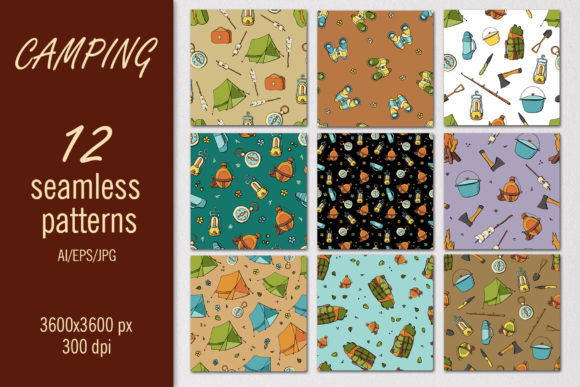
The set contains 12 seamless patterns, each delivered in two formats: EPS and AI vector files, alongside 12 high-resolution JPG images at 4500x4500 pixels (12x12 inches at 300 dpi). This dual-delivery approach addresses two common workflow needs. The vector files allow you to scale the patterns infinitely without loss of quality, which is essential when you are moving from a small packaging mock-up to a large-format banner or textile print. The raster files give you a ready-to-place image for quick prototyping or digital rendering where vector handling is not required.
Because the patterns are seamless, they repeat uniformly across any surface, eliminating visible edges or awkward transitions. That aspect alone saves significant time during the design phase, as you do not need to spend extra hours aligning repeats or fixing tile boundaries. The camping theme naturally includes motifs such as tents, trees, campsite gear, and outdoor textures, making the collection immediately relevant for brands, publications, or products targeting the adventure and outdoor recreation market.
Where This Collection Fits in a Broader Creative Workflow
Understanding where pattern assets enter and exit your process helps you use them more efficiently. The Camping - Patterns collection can be introduced at multiple points depending on your role and project type.
Pre-Production Planning and Asset Selection
If you are a designer or art director starting a new product line, you likely begin with mood boards and concept sheets. At this stage, you might pull JPG previews from the collection to test color schemes and motif density alongside your brand palette. Because the files are consistently sized, you can drop them into a layout or presentation without resizing conflicts. This early-stage integration helps you decide which pattern direction fits before committing to detailed vector work.
During Production: Applying Patterns to Surfaces
Once the concept is approved, the vector files become the primary working assets. In Adobe Illustrator, you can open the AI files, modify colors to match brand guidelines, and apply the patterns to objects, shapes, or entire layouts using the swatch panel. The EPS files serve as a backup format for importing into other vector applications or for older versions of design software. For textile or print-on-demand workflows, you can export the vector pattern at any scale, ensuring the repeat remains crisp at 5 inches or 50 feet.
Post-Production Quality Control and Consistency
After applying the patterns, you need to verify that the scale, rotation, and color hold across the entire product range. The 4500x4500 pixel JPG files act as a reliable reference image. You can place the raster file into a mock-up folder, compare it side by side with your vector application, and confirm that no unexpected shifts occurred during export. This consistency check is especially important when the same pattern appears on multiple items, such as a tent bag, a water bottle label, and a smartphone case.
Practical Use Cases Across Creative Disciplines
Different professionals will interact with the Camping - Patterns collection in distinct ways. Below are several real-world scenarios that illustrate its versatility.
Textile and Fashion Design
If you produce outdoor apparel or camping gear, seamless patterns are a foundational asset. You can scale the vector tiles to match garment dimensions, rotate them for directional flow, and overlay them onto technical sketches. Because the patterns are digital, you can generate multiple color variants and test them against fabric swatches without producing a single physical sample. This reduces material waste and shortens the iteration cycle.
Surface Pattern Design for Home Decor and Stationery
For wrapping paper, wallpaper, or throw pillows, the 12x12 inch canvas size at 300 dpi is already print-ready for many standard paper sizes. You can place a single JPG tile into a print document and repeat it manually, or import the vector file into a print layout program and let the tile engine handle the repetition. The camping motifs work especially well for seasonal product drops, such as summer outdoor collections or nature-themed home décor lines.
Digital and Print Publishing
Bloggers, small publishers, and content creators often need background textures or decorative elements for guides, e-books, and social media templates. With the Camping - Patterns collection, you can use the JPG files directly as backgrounds in Canva, Photoshop, or Keynote. The 4500x4500 resolution gives you room to crop or reposition the pattern while maintaining enough detail for print-on-demand covers or digital ads. For blog headers or Instagram story backgrounds, the patterns add visual interest without requiring you to build a repeat from scratch.
Integrating the Collection with Other Tools and Assets
No pattern collection exists in isolation. The Camping - Patterns set works best when combined with your existing design library, typography, and brand elements. The vector files are organized in both EPS and AI formats, so they are compatible with most major vector software including Adobe Illustrator, Affinity Designer, CorelDRAW, and Inkscape. If you work primarily in raster-based tools such as Photoshop or Procreate, you can open the JPG files and use them as stamp brushes, clipping masks, or texture overlays.
For users who manage large asset libraries, the consistent file naming and uniform dimensions simplify cataloging. You can batch rename the files to match your internal taxonomy, add metadata tags like "camping," "outdoor," or "seamless pattern," and import them into digital asset management systems. This preparation pays off when you need to locate a specific motif months later for a repeat order or a new project.
Organizing and Managing Pattern Assets for Long-Term Use
A digital collection is only as useful as your ability to find and retrieve it. When you download the Camping - Patterns files, consider setting up a dedicated folder structure before you begin working. Separate the vector files from the raster files, and create subfolders for each pattern variation if you plan to produce color edits. A simple naming convention such as Pattern_01_Camping_Trees helps you scan and select quickly.
If you collaborate with a team, store the master vector files in a shared location with version control. Keep the original EPS and AI files untouched, and work from copies when you alter colors or scale. That way, you always have a clean master to revert to if a client requests a different colorway or a larger format down the line.
Quality Control and Output Consistency
Seamless patterns require attention to repeat integrity. Before you finalize any design, test the pattern on a large canvas to confirm that the tile edges are invisible. The collection is built to be seamless, but scaling or rotating the tile inside a design application can sometimes introduce gaps if the software handles the repeat differently. Use the Pattern Preview mode in Illustrator or place two adjacent JPG copies side by side in Photoshop to verify smooth transitions.
Color consistency is another factor. The JPG files are sRGB by default, which is suitable for web and digital display. For print production, convert the vector files to CMYK and check that the motif colors map correctly to your printer's profile. If you are printing on fabric, request a physical strike-off to see how the pattern performs on the actual material, especially if it involves fine lines or small icons that might blur on textured surfaces.
Scaling and Customizing for Different Output Formats
One of the main advantages of this collection is the ability to scale the patterns without degradation. For small items such as business cards or stickers, you can reduce the pattern size and still retain detail. For large surfaces such as wallpaper murals or retail signage, you can increase the scale dramatically while keeping every line clean. When you need a lighter or more subtle version of a pattern, duplicate the vector tile and reduce the opacity or apply a gradient mask over the repeat.
If you want to create custom color variations, open the EPS or AI file, select the motif elements, and replace the fill colors with your brand palette. Because the patterns are vector-based, this process takes only a few minutes per file and gives you a completely new look without building a new motif from scratch. You can also combine patterns by layering one tile over another with different blend modes in Photoshop, creating hybrid textures that feel unique to your project.
Final Observations on Working with This Collection
The Camping - Patterns collection is a practical asset for anyone who produces visual content around the outdoors. It removes the need to draw repetitive motifs from scratch, provides a consistent baseline for quality, and scales across digital and print media. Whether you are designing a full apparel line, creating seasonal packaging, or building a set of social media templates, having a library of tested seamless patterns accelerates your workflow and frees your attention for higher-level creative decisions.
Because the files are delivered in both vector and high-resolution raster formats, they accommodate different software preferences and production pipelines. The key to getting the most out of this collection is to integrate it early in your planning, maintain organized backups, and test the output at your target dimensions before going to final production. With these practices in place, the patterns become a reliable component of your design toolkit rather than an afterthought.